



Why Continuous Database Inventory Matters
If your database inventory lives in a spreadsheet that gets updated once a quarter, you have a problem. Between updates, new instances spin up, configurations drift, features get enabled, and databases get decommissioned, all without a trace. When an audit arrives, the scramble to reconcile what exists with what’s documented wastes time, burns resources, and creates risk.
Continuous database inventory eliminates that gap. Instead of periodic snapshots assembled by hand, an automated system discovers and tracks every database instance, host, and configuration change as it happens. The result is an always-current inventory that serves as the foundation for license compliance, configuration governance, and audit defense.
Below are the best practices we recommend for getting continuous inventory right.
Use Agentless, Read-Only Data Collection
The best inventory systems collect metadata without installing agents on database servers and without touching application data. This approach reduces deployment friction, minimizes security concerns, and keeps the footprint light.
What to configure:
- Database connections – Connect directly to database instances using standard read-only credentials. For Oracle environments, query system catalog views such as
DBA_FEATURE_USAGE_STATISTICSto detect enabled features and configuration details. - Cloud infrastructure connections – For AWS and other cloud providers, create a cross-account read-only IAM role that can enumerate infrastructure resources like RDS instances and database workloads on EC2.
Best practices:
- Deploy your collection tool on a bastion host or DBA workstation
- Create dedicated read-only database credentials. Never reuse application or admin accounts.
- Validate that queries can access the system catalog views required for feature usage and configuration detection
- Grant only the minimum IAM permissions needed to describe cloud resources
Unify Inventory Across All Platforms
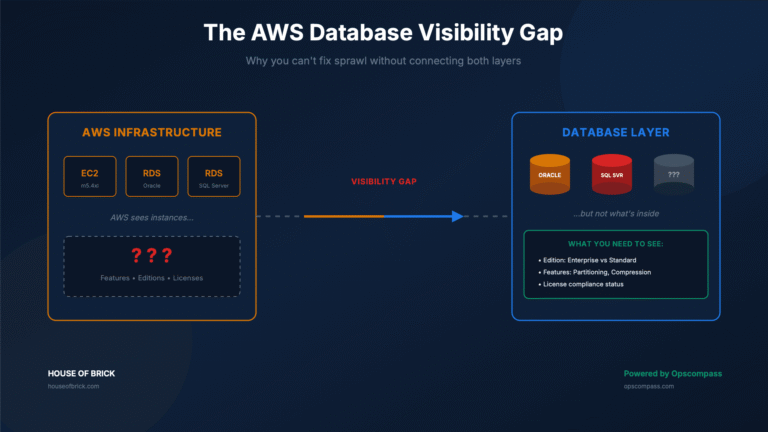
Most organizations run databases across multiple environments: on-premises data centers, AWS, Azure, Google Cloud, and VMware. When each environment is tracked with a different tool or spreadsheet, gaps and inconsistencies are inevitable.
A unified inventory normalizes database resources from every environment into a single model. This gives you one place to see every database instance, its underlying host, and its infrastructure placement, regardless of where it runs.
Best practices:
- Connect every environment that can host a database, including development and staging
- Validate that inventory includes database instances, underlying hosts, and infrastructure placement
- Confirm that each resource is associated with the correct environment or account
- Eliminate parallel tracking systems (spreadsheets, CMDBs updated manually) once the unified inventory is validated
Enable Automated, Continuous Discovery
A one-time inventory is outdated the moment it’s completed. Continuous discovery detects changes as they happen rather than during the next scheduled audit. This is especially critical for catching licensing risk caused by VM drift and shadow databases that are invisible to your official inventory.
What continuous discovery should detect:
- New database instances appearing in any environment
- Databases that have been decommissioned
- Configuration changes to existing databases
- Infrastructure changes that affect licensing exposure
Best practices:
- Enable automated discovery scans across all cloud accounts, all regions, and all known database servers
- Configure alerts for newly discovered databases, removed instances, and environment changes
- Use discovery data to catch database sprawl and shadow deployments before they become audit findings
Capture Configuration and Feature Metadata
Knowing that a database exists is not enough. You also need to know what it’s running, how it’s configured, and which features are enabled, because those details drive licensing obligations. Unlicensed feature usage is one of the most common and expensive audit findings.
Key metadata to collect:
- Database version and patch level
- Instance configuration parameters
- Infrastructure placement (physical host, VM, cloud instance type)
- Database feature usage flags
- Host mapping used for licensing calculations
This metadata allows you to identify feature usage that could trigger additional license requirements, analyze licensing exposure across your infrastructure, and reconstruct historical configurations when you need to defend an audit position.
Important: Your collection process should capture only the metadata needed to understand the environment. It should not collect table data, application data, or query contents.
Maintain a Historical Inventory Timeline
One of the hardest questions to answer during an audit is: What did the environment look like six months ago? Without historical records, you’re left guessing.
A historical inventory timeline preserves snapshots of configuration and usage data over time, giving you the evidence to prove exactly what was running, when features were activated, and how infrastructure changed.
Best practices:
- Retain historical configuration snapshots. Do not overwrite previous states.
- Monitor drift logs for changes between snapshots
- Preserve discovery records as formal audit evidence
With historical data, you can demonstrate:
- When specific features were first activated or deactivated
- When databases were created or removed
- How infrastructure placement changed over time
This time-series visibility turns audit defense from a reactive scramble into a matter of pulling the right report.
The Bottom Line
Continuous database inventory is the foundation of audit readiness. By combining agentless data collection, unified multi-platform tracking, automated discovery, rich metadata capture, and historical timelines, you build an environment where inventory is always current and audit evidence is always available.
The organizations that invest in this foundation spend less time reacting to audits and more time managing their database environments proactively. Managed Opscompass Services from House of Brick can help you get there. Schedule a demo to see how continuous inventory works in practice.