
I talk to database administrators every week who are dealing with AWS database sprawl. They have RDS instances multiplying across accounts, EC2-hosted Oracle and SQL Server databases that nobody remembers provisioning, and dev/test environments that were supposed to be temporary six months ago.
The common thread? They all tried to solve the problem using only AWS tools, and it didn’t work.
Let me explain why.
AWS Sees Instances, Not Databases
AWS provides solid visibility into your infrastructure. AWS Config can tell you that you have 47 RDS instances. It knows the instance class, the region, when it was created, and who created it.
But AWS tools see instances, not databases. They have no visibility into what’s happening inside those databases. For Oracle and SQL Server workloads, this is where the real risk lives.
What AWS Cannot Tell You About Oracle
Consider what AWS cannot tell you about an RDS Oracle instance:
- Whether your database has compressed tables (that requires an Advanced Compression license)
- Whether someone used a feature of the Diagnostics Pack (also an extra license)
- Whether Partitioning is being used (another license)
- Whether any licensable features were ever used
That last point matters more than people realize. During an Oracle audit, the question isn’t just “are you using this feature today?” The question is “have you ever used this feature?” If the first time you are learning about unlicensed feature usage in your databases is during an Oracle audit, you are immediately in a weak negotiating position, and subject to Oracle’s costly demands.
What AWS Cannot Tell You About SQL Server
SQL Server licensing in AWS has its own blind spots. AWS can tell you that an RDS instance is running SQL Server Enterprise Edition. What it cannot tell you:
- Whether Enterprise Edition features like online index operations or full Always On Availability Groups are actually in use
- Whether Standard Edition would be sufficient for the workload
- How your SQL Server licensing maps to AWS vCPUs under Microsoft’s mobility rules
Here’s the challenge: many organizations over-license because they don’t know what features they’re actually using. They deploy Enterprise Edition “just in case” when Standard Edition would work fine. AWS has no mechanism to tell you whether that expensive Enterprise license is necessary.
On the flip side, some organizations under-license. A developer enables an Enterprise feature on what they thought was a test database, and suddenly you have a compliance gap.
The EC2 Blind Spot
Self-managed Oracle and SQL Server databases running on EC2 create an even bigger gap. AWS inventory tools track the EC2 instance. They can tell you it’s a db.m5.4xlarge with 16 vCPUs. What they cannot tell you:
- Whether Oracle or SQL Server is even installed
- What edition is running (Enterprise, Standard, Express)
- What database features are in use
- Whether the database is properly licensed for that instance size
We see this constantly in migration projects. A customer tells us they have 40 Oracle databases and 60 SQL Server databases in AWS. After we run our discovery scripts, we find 55 Oracle instances and 78 SQL Server instances. The missing databases are running on EC2 instances that nobody realized were database servers.
Why This Breaks Cloud Migrations
Database sprawl doesn’t just create compliance risk in your current environment. It actively undermines cloud migration projects.
I’ve watched migration timelines slip by months because the project team discovered databases they didn’t know existed. Here’s a typical scenario:
The migration team plans to move 100 databases from on-premises to AWS over six months. Three months in, they discover 30 additional databases that weren’t in the original inventory. Some are on old VMware clusters. Some are SQL Server Express instances embedded in applications. Some are Oracle databases that a team spun up years ago for a project that ended.
Now the project is behind schedule. Worse, the licensing model they planned doesn’t work anymore. They budgeted for 100 database resources worth of licenses, but now need resources for an additional 30 databases, increasing license costs.
The Pre-Migration Visibility Gap
Successful migrations require answering questions that AWS tools and spreadsheets cannot answer:
For Oracle:
- What processor licenses do we need based on actual CPU consumption?
- Which databases are using features that require additional licensing?
- What’s the licensing impact of moving from on-premises VMware to AWS RDS?
For SQL Server:
- Are we using Enterprise Edition features, or can we migrate to Standard?
- Which instances qualify for Azure Hybrid Benefit or License Mobility?
- What’s our true-up exposure if we migrate without cleaning up first?
Without answers to these questions, you’re guessing. And guessing on licensing usually means either overspending or creating compliance gaps.
Why Spreadsheets Can’t Bridge the Gap
Some organizations try to solve this with spreadsheets. The DBA maintains a list of databases, their locations, their editions, and their license assignments. Updates happen quarterly, or when someone remembers.
This approach has problems.
First, spreadsheets are always out of date. Databases change weekly. An administrator upgrades an instance class. A developer enables Multi-AZ for testing. Someone accidentally turns on an Oracle feature or a SQL Server Enterprise capability. By the time the spreadsheet gets updated, you’ve been out of compliance for months.
Second, spreadsheets can’t connect AWS infrastructure data to database-level data. You end up with two separate inventories that don’t reconcile. The AWS inventory says you have 50 database instances. The DBA spreadsheet lists 45 databases. Which one is wrong? You don’t know until an auditor finds out for you.
You Need Both Sides of the Picture
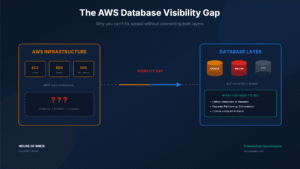
Here’s the core problem: AWS tools see the infrastructure but not the database. DBA tools see the database but not the infrastructure. Neither gives you the full picture.
To actually fix database sprawl, you need visibility that connects both layers:
Infrastructure layer (what AWS can tell you):
- Instance inventory across all accounts and regions
- Instance configurations (size, availability zones, storage)
- Cost data and change history
Database layer (what AWS cannot tell you):
- Database software editions (Oracle EE vs SE2, SQL Server Enterprise vs Standard)
- Feature usage (Oracle options, SQL Server EE features like online indexing)
- Historical usage patterns
- Compliance status against your entitlements
When these two layers are connected, you can answer the questions that matter: Do I have databases running on instances that aren’t properly licensed? Are any of my databases using features I don’t own? What’s the real scope of my environment before I start a migration?
A Real-World Example
A customer is planning a migration from on-premises SQL Server to AWS RDS. They have 50 SQL Server databases, all running Enterprise Edition on-premises because “that’s what we’ve always used.”
Before the migration, we run discovery scripts against those databases. We find that only 12 of the 50 databases actually use Enterprise Edition features. The other 38 could run on Standard Edition.
The cost difference is significant. SQL Server Enterprise Edition licensing costs roughly four times what Standard Edition costs per core. By right-sizing before migration, the customer avoids years of overspending on licenses they don’t need.
Without database-level visibility, they would have migrated all 50 databases as Enterprise Edition and never known they were overpaying.
Connecting the Dots with Opscompass
This is exactly why we built Opscompass.
Opscompass connects to your AWS environment and to your databases. It pulls infrastructure data from AWS APIs and database-level data from the databases themselves. Then it correlates the two.
When someone uses an Oracle option or turns on an Enterprise feature in SQL Server, Opscompass detects the change and flags it as a licensing concern. Getting notified and stopping unlicensed feature usage as quickly as possible makes you better prepared in the event of an audit.
When you’re planning a migration, Opscompass shows you the complete picture: what databases exist, what features they use, what licenses they require, and where you have opportunities to consolidate or right-size.
Stop Managing Half the Problem
Database sprawl is a real issue in AWS environments. The solution isn’t better spreadsheets or more AWS dashboards. The solution is visibility that spans both the infrastructure layer and the database layer, for both Oracle and SQL Server.
If you’re trying to get control of your AWS database estate, or if you’re planning a migration and you’re worried about licensing surprises, schedule a demo to see how Opscompass connects your AWS infrastructure data to your database compliance data.